If you purchase through links on this page, AIToolBet may earn a commission at no extra cost to you. Our reviews are based on product research and, whenever possible, hands-on testing.
 AI Assistant
Claude Review
AI assistant for long-form writing, document analysis, coding help, and business workflows.
Affiliate Disclosure
Quick facts
Claude at a glance
Setup Time
10 minutes
Pricing
Free plan available; paid Claude plans are available for individuals and teams, with enterprise options for larger organizations
Free Plan
Free plan available
Platforms
Web, Desktop, Mobile
Best For
Long document analysis, Executive writing, Research synthesis, Careful reasoning, Code explanation
Overall Rating
4.8 / 5
Overview
What is Claude?
Claude is best understood as a document-first AI assistant for people who need careful writing, source synthesis, and explanatory help across longer work sessions. Its strongest fit is not quick visual production or a broad app marketplace; it is the work of reading dense context, keeping instructions together, and turning that context into polished memos, research summaries, planning notes, and code explanations.
The buying case is strongest for writers, analysts, consultants, developers, and business teams that routinely bring their own source material. Claude’s long-context workflow matters because users can review transcripts, reports, agreements, or project notes without repeatedly rebuilding the background. The tradeoff is that plan limits, model access, data policies, and current pricing still need to be checked before a team standardizes on it.
Compared with broader assistants, Claude is a better fit when writing quality and document reasoning matter more than native image generation, spreadsheet automation, or deep ecosystem integrations. Choose it when the primary job is understanding and improving text-heavy work; compare alternatives when your workflow depends on web-cited research, Microsoft 365 adjacency, or IDE-native repository automation.
Overall Rating
4.8/5
Starting Price
Free plan available; paid Claude plans are available for individuals and teams, with enterprise options for larger organizations
Free Trial
Free plan available
Best For
Long document analysis, Executive writing, Research synthesis, Careful reasoning, Code explanation.
Screenshots
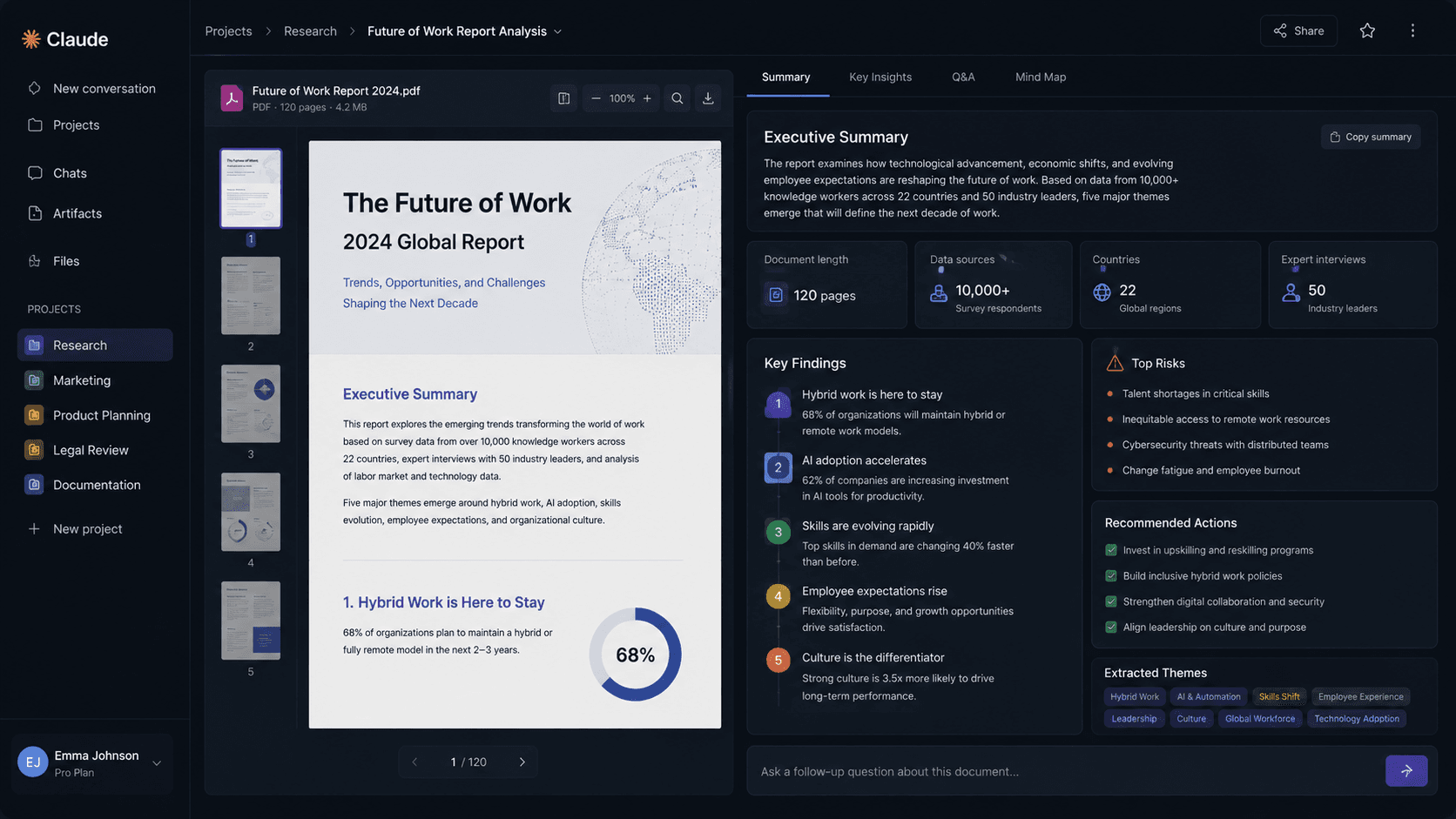
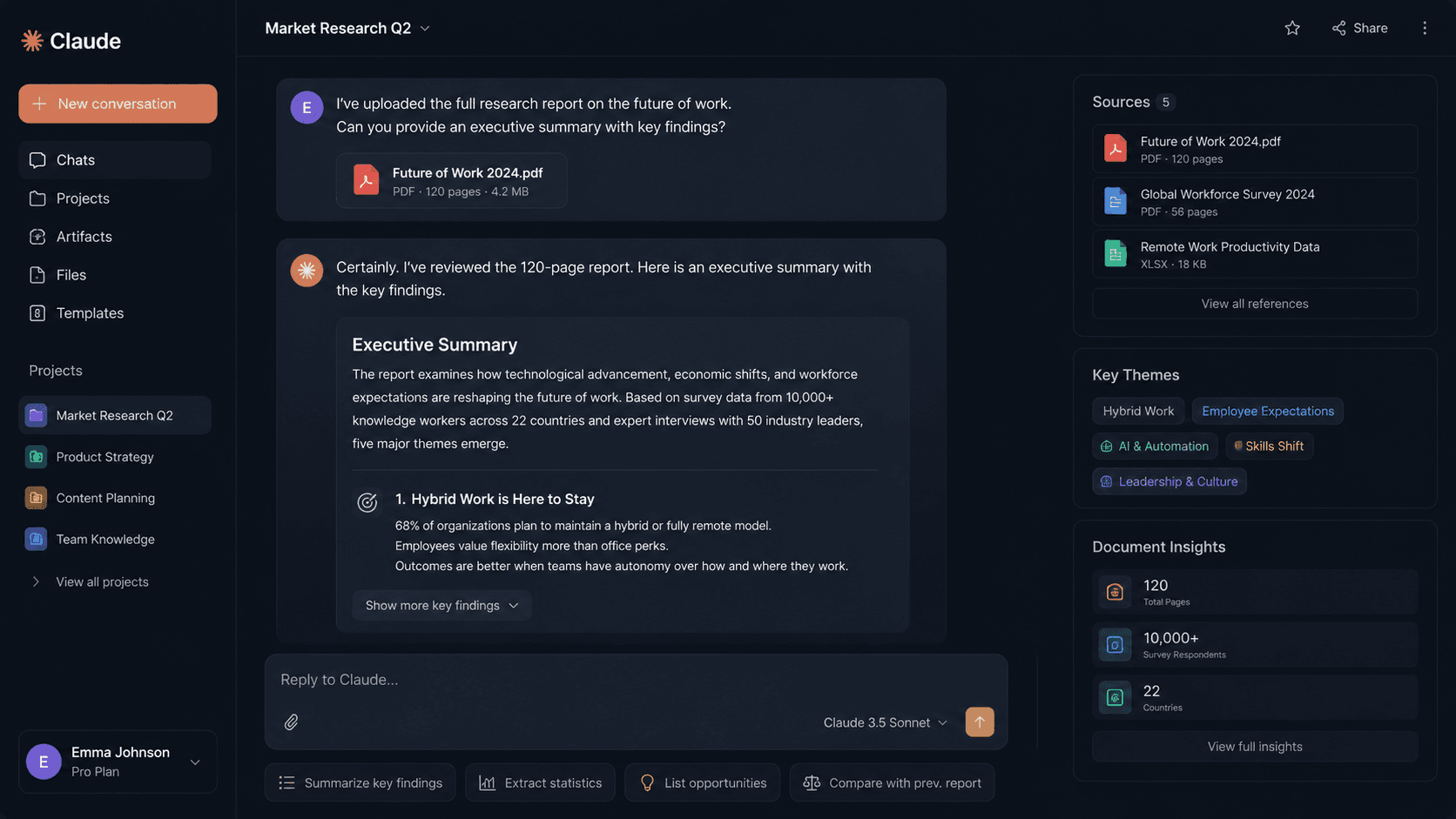
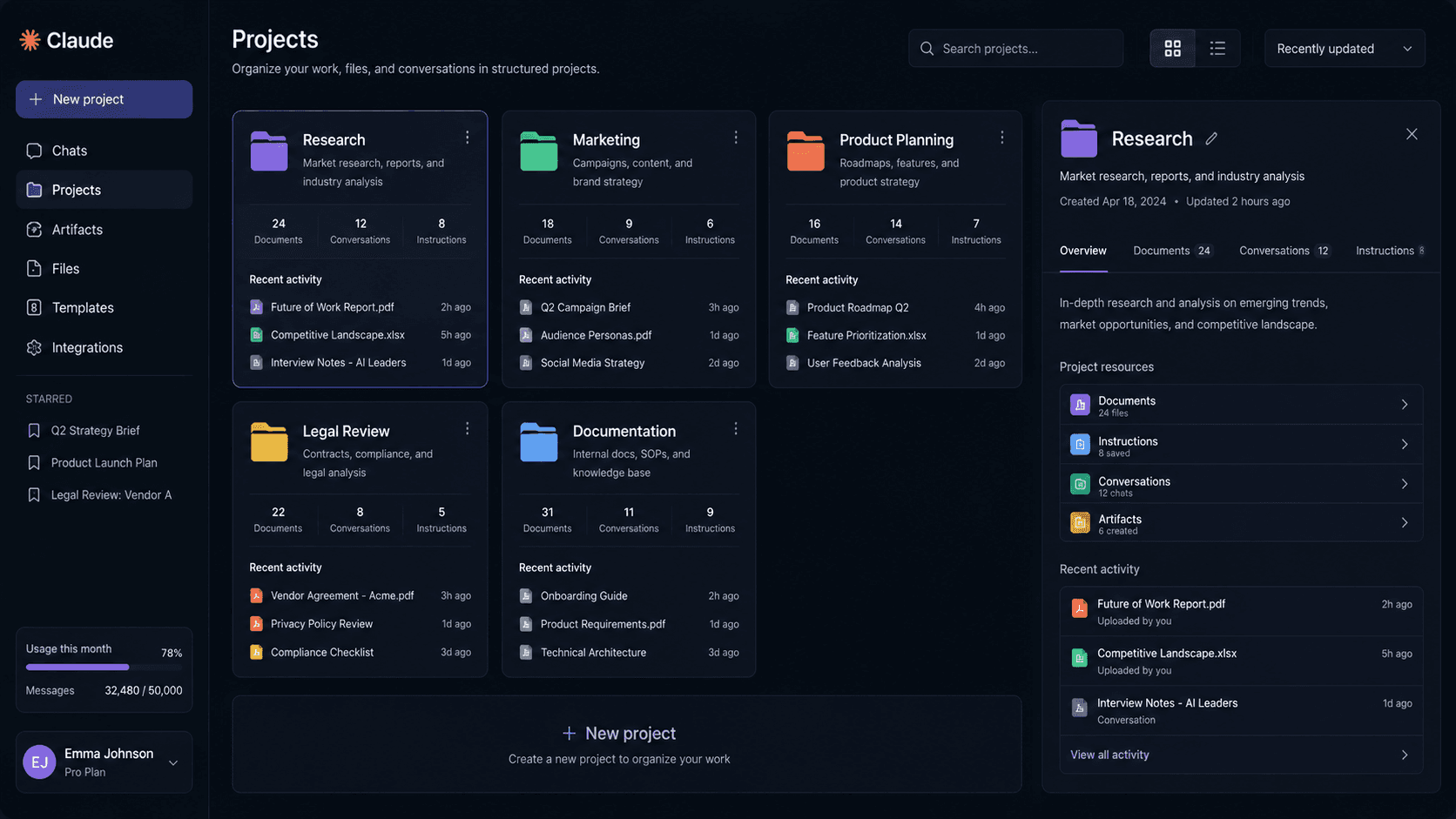
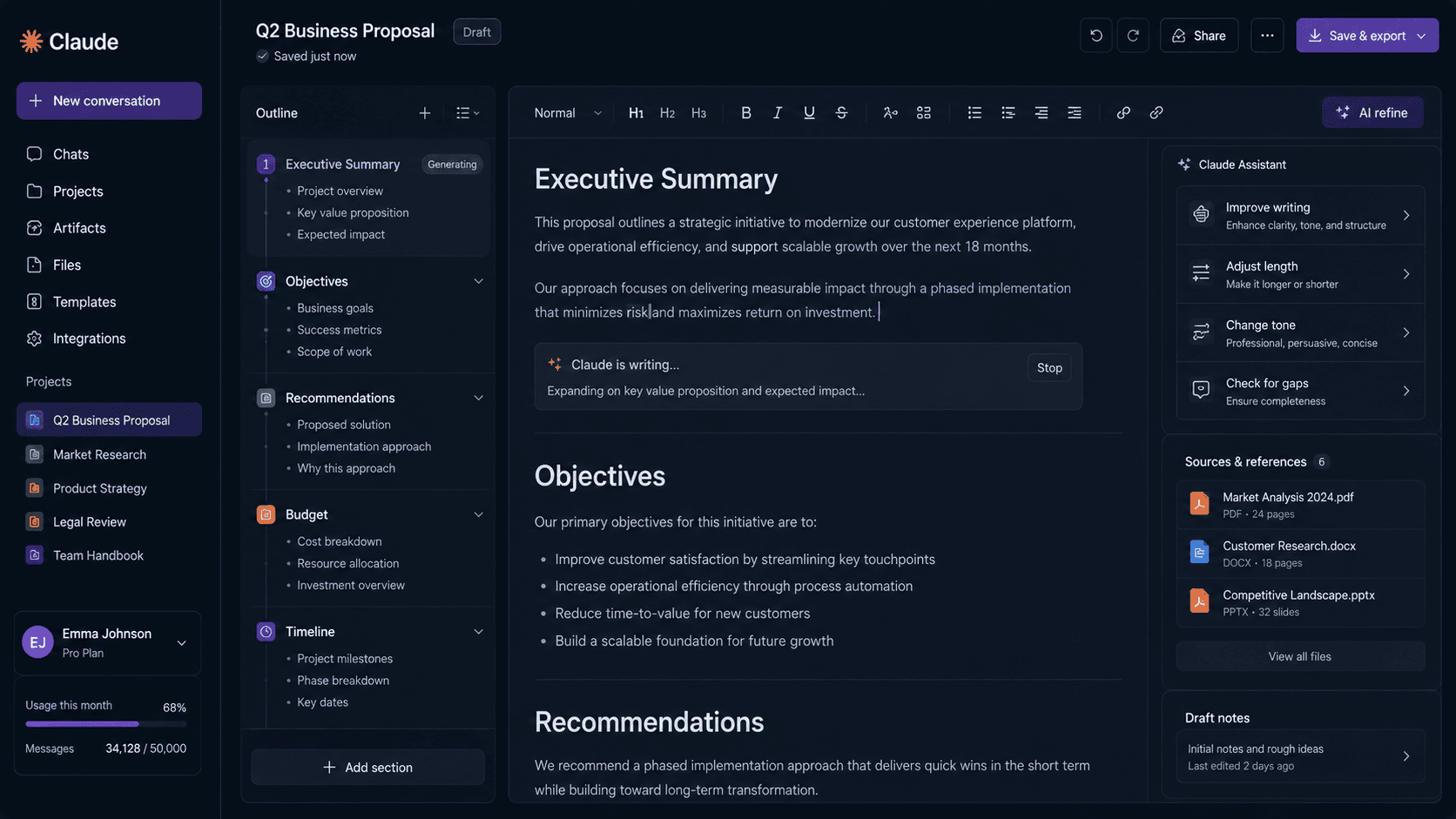
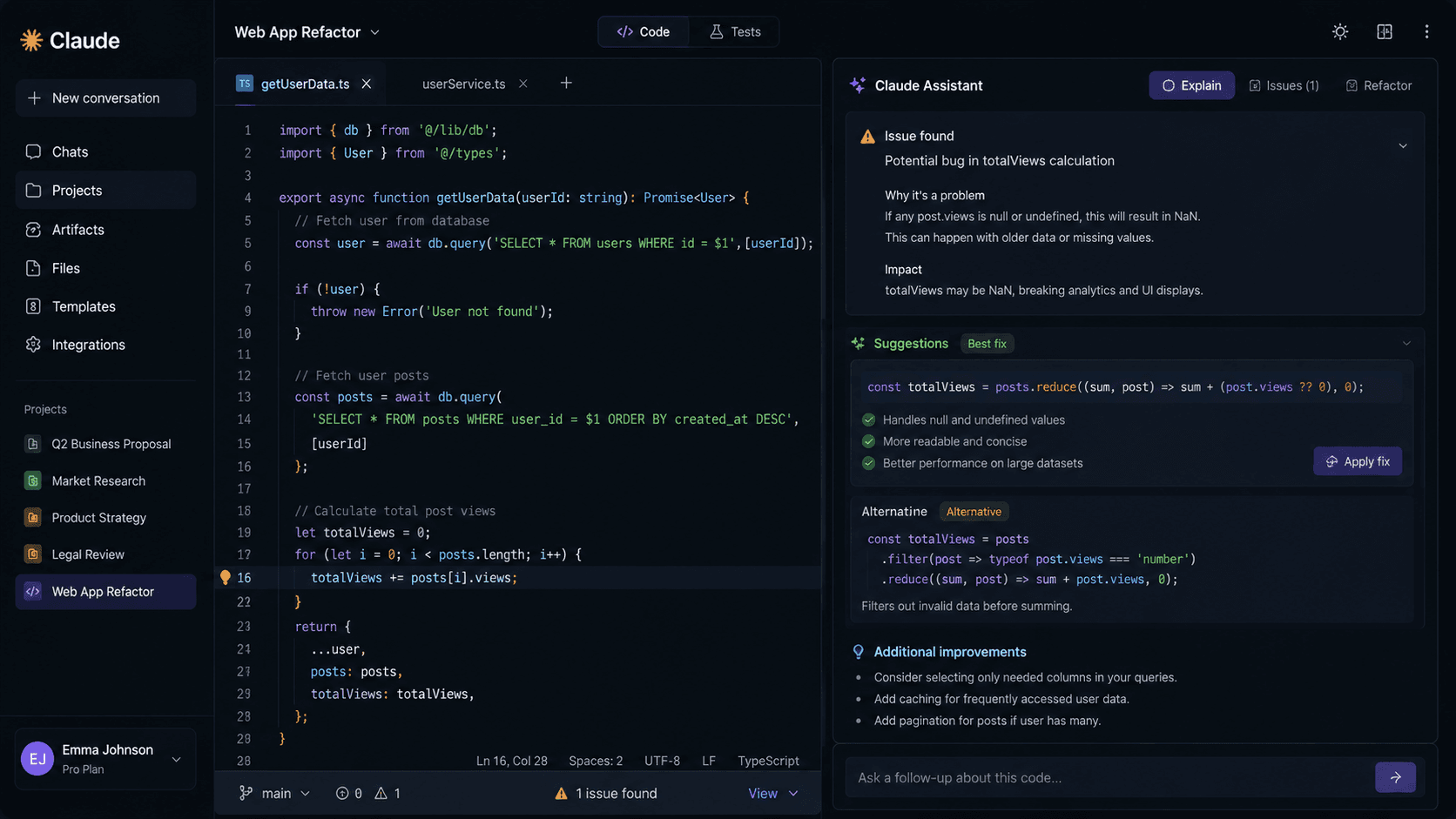
Claude product gallery
Features
How the key features work in practice
Long Context
What it does
Reviews lengthy documents, transcripts, research packets, and multi-file context in one workflow.
Why it matters
Users can ask better follow-up questions without repeatedly restating the background.
Who benefits most
researchers, lawyers, analysts, consultants
Real-world example
A consultant can upload meeting notes, client research, and a draft recommendation, then ask Claude to identify missing assumptions before a client presentation.
Tradeoff or limitation
Very large or sensitive document workflows still require checking plan limits and data policies.
Recommended workflow
Start with a real work packet, ask Claude for a first-pass read, then verify the output before it becomes client, legal, financial, or production material.
Writing Quality
What it does
Turns rough notes into polished memos, briefs, summaries, and editorial drafts.
Why it matters
The output usually needs less rewriting for tone and structure than generic short-form assistant responses.
Who benefits most
writers, executives, marketers, consultants
Real-world example
An operations leader can turn scattered policy notes into a clear internal announcement.
Tradeoff or limitation
Facts, citations, and current details still need independent verification.
Recommended workflow
Start with a real work packet, ask Claude for a first-pass read, then verify the output before it becomes client, legal, financial, or production material.
Analysis
What it does
Compares sources, extracts themes, and organizes complex information into structured findings.
Why it matters
It gives reviewers a starting framework before they make final human judgments.
Who benefits most
researchers, analysts, strategy teams
Real-world example
A researcher can compare several reports and ask Claude to group recurring risks, disagreements, and open questions.
Recommended workflow
Start with a real work packet, ask Claude for a first-pass read, then verify the output before it becomes client, legal, financial, or production material.
Coding Support
What it does
Explains code, suggests implementation changes, and helps debug technical details.
Why it matters
It is useful when a developer needs reasoning and explanation rather than only autocomplete.
Who benefits most
developers, technical founders, product managers
Real-world example
A developer can paste a failing function and ask Claude to explain the likely bug before editing the codebase.
Tradeoff or limitation
Dedicated IDE agents may be better for repository-wide edits and terminal-driven automation.
Recommended workflow
Start with a real work packet, ask Claude for a first-pass read, then verify the output before it becomes client, legal, financial, or production material.
Team Workspace
What it does
Project-style workflows keep instructions, files, and ongoing context together for teams.
Why it matters
Recurring work can continue without rebuilding the same context every session.
Who benefits most
business teams, operations leaders, consultants
Real-world example
A legal operations team can keep vendor agreements and review instructions together while preparing issues for counsel.
Recommended workflow
Start with a real work packet, ask Claude for a first-pass read, then verify the output before it becomes client, legal, financial, or production material.
Integrations and Sharing
What it does
Claude supports handoffs through exports, sharing, integrations, or collaboration patterns that fit day-to-day work.
Pros & Cons
A balanced Claude review
Pros
- Excellent long-context document handling for research packets, transcripts, agreements, and multi-file background material.
- Polished writing style for memos, briefs, summaries, editorial drafts, and careful internal communication.
- Strong analysis workflows for comparing sources, extracting themes, organizing risks, and explaining technical details.
- Project-style team workspace can keep recurring instructions, files, and context together across sessions.
- Helpful coding support when the user needs reasoning, explanation, and suggested implementation changes rather than only autocomplete.
Cons
- Claude may have fewer broad workflow integrations than assistants embedded in larger productivity ecosystems.
- It is not the right primary purchase for image generation, graphic design, ad creative production, or other specialized media workflows.
- Pricing, model access, message limits, document limits, and regional availability can change, so buyers must verify the current plan details before upgrading.
- Teams handling sensitive or regulated documents still need to review data policies, governance requirements, and approval workflows before rollout.
Editorial rating
Claude rating breakdown
Ease of Use
4.7 / 5
Features
4.7 / 5
AI Quality
4.8 / 5
Templates
4.3 / 5
Automation
4.6 / 5
Pricing
4.6 / 5
Support
4.4 / 5
Overall
4.8 / 5
Pricing
Claude pricing plans
Free
Free
Entry plan for trying Claude with limited usage.
- Chat with Claude
- Analyze text and uploaded documents within plan limits
- Use available Claude models within current free-plan limits
Pro
Paid monthly or annual plan
For individuals who need more usage and access to Claude’s advanced capabilities.
- Higher usage limits than Free
- Access to advanced Claude models when available
- Projects and extended work sessions within plan limits
Team
Paid per-user team plan
For teams that want shared workspaces and collaboration around Claude.
- Team workspace
- Higher team usage limits
- Collaboration and administration features
Enterprise
Custom
For organizations that need larger-scale deployment, security, and support.
- Enterprise administration
- Security and compliance options
- Custom deployment and support discussions
Best fit
Who should use Claude
Writers and editors who need polished long-form
Writers and editors who need polished long-form drafts, executive briefs, summaries, and careful rewrites from rough notes.
Researchers, analysts, consultants, and legal-ad
Researchers, analysts, consultants, and legal-adjacent teams that review long documents, compare sources, and turn dense material into structured findings.
Developers and technical founders who want code
Developers and technical founders who want code explanation, bug reasoning, implementation suggestions, and plain-English technical review.
Business and operations teams that repeatedly co
Business and operations teams that repeatedly convert meetings, policies, vendor documents, and planning notes into clearer deliverables.
Teams willing to check plan limits and data poli
Teams willing to check plan limits and data policies because they expect repeated value from shared document-heavy workflows.
Not a fit
Who should skip Claude
Design, ad creative, or social teams whose main
Design, ad creative, or social teams whose main job is native image generation or visual asset production.
Spreadsheet-heavy operators who need deep workbo
Spreadsheet-heavy operators who need deep workbook automation, formulas, pivots, and spreadsheet-native workflows.
Developers who primarily want in-editor agent ac
Developers who primarily want in-editor agent actions, terminal control, repository-wide refactors, and Git automation.
Teams that need a larger productivity-suite ecos
Teams that need a larger productivity-suite ecosystem or web-cited answer engine more than standalone document synthesis.
Occasional users who only need light experimenta
Occasional users who only need light experimentation and can stay within the Free plan.
Use cases
Real-world ways to use Claude
Contract Review
Scenario
Legal team handling contract review.
Problem
The work is advanced enough that a shallow prompt can miss context, risks, or the next practical step.
How Claude solves it
Upload multiple vendor agreements into a Claude project and ask it to identify conflicting indemnity clauses, renewal terms, and unusual obligations before legal review.
Expected outcome
Expected outcome: Several hours of first-pass review. The human reviewer can spend more time judging the result instead of assembling the first pass.
Executive Brief Drafting
Scenario
Business operations team handling executive brief drafting.
Problem
The work is intermediate enough that a shallow prompt can miss context, risks, or the next practical step.
How Claude solves it
Provide meeting notes, goals, and a rough recommendation, then ask Claude to produce a concise memo with assumptions, risks, and next steps.
Expected outcome
Expected outcome: One to two drafting cycles. The human reviewer can spend more time judging the result instead of assembling the first pass.
Research Synthesis
Scenario
Research team handling research synthesis.
Problem
The work is intermediate enough that a shallow prompt can miss context, risks, or the next practical step.
How Claude solves it
Upload reports and transcripts, ask Claude to group recurring themes, contradictions, and open questions, then use the output as an analyst outline.
Expected outcome
Expected outcome: Several hours on dense source packets. The human reviewer can spend more time judging the result instead of assembling the first pass.
Code Explanation
Scenario
Software development team handling code explanation.
Problem
The work is intermediate enough that a shallow prompt can miss context, risks, or the next practical step.
How Claude solves it
Paste an unfamiliar function, error message, or pull request excerpt and ask Claude to explain behavior, likely failure points, and safer next edits.
Expected outcome
Expected outcome: Faster onboarding to unfamiliar code. The human reviewer can spend more time judging the result instead of assembling the first pass.
Policy Drafting
Scenario
Operations team handling policy drafting.
Problem
The work is beginner enough that a shallow prompt can miss context, risks, or the next practical step.
How Claude solves it
Collect existing policy snippets and stakeholder notes, then ask Claude to turn them into a structured draft with sections for scope, responsibilities, and exceptions.
Expected outcome
Expected outcome: One initial draft pass. The human reviewer can spend more time judging the result instead of assembling the first pass.
If these workflows match work you do every week, check Claude's current plans and limits before choosing a paid tier. Occasional users should start with the free option when available.
Alternatives
Claude alternatives to compare
G
Gemini
Compare Gemini with Claude before choosing an AI assistant.
Comparison onlyP
Perplexity
Compare Perplexity with Claude before choosing an AI assistant.
Comparison onlyM
Microsoft Copilot
Compare Microsoft Copilot with Claude before choosing an AI assistant.
Comparison onlyComparison
Claude comparison table
| Feature | Claude | ChatGPT | Gemini | Perplexity |
|---|---|---|---|---|
| Primary strength | Long Context | Specialized alternative | Google ecosystem | Source-first research |
| Best for | Long document analysis, Executive writing, Research synthesis, Careful reasoning, Code explanation | Teams comparing ChatGPT for adjacent workflows | Teams comparing Gemini for adjacent workflows | Teams comparing Perplexity for adjacent workflows |
| Pricing model | Free plan available; paid Claude plans are available for individuals and teams, with enterprise options for larger organizations | Free, paid, or custom plans depending on usage | Free, paid, or custom plans depending on usage | Free, paid, or custom plans depending on usage |
| Setup effort | 10 minutes | Low to moderate depending on migration and team size | Low to moderate depending on migration and team size | Low to moderate depending on migration and team size |
| When to choose it | Claude is a strong AI assistant for long-form writing, long-context document analysis, research synthesis, business communication, and coding support. | Choose ChatGPT when its ecosystem, workflow, or category focus is a better match than Claude. | Choose Gemini when its ecosystem, workflow, or category focus is a better match than Claude. | Choose Perplexity when its ecosystem, workflow, or category focus is a better match than Claude. |
FAQ
Frequently asked questions
Is Claude best for long documents?
Yes. The strongest supplied use case is reviewing lengthy documents, transcripts, research packets, and multi-file context, then answering follow-up questions without rebuilding the background each time.
Does Claude have a free plan?
Yes. Claude has a Free plan for trying chat and document analysis within limits. Heavy users should compare current Pro, Team, and Enterprise limits before upgrading.
Who gets the most value from Claude Pro?
Pro makes the most sense for individuals who use Claude regularly for writing, document analysis, coding questions, and research synthesis and who run into free-plan limits.
When should a company consider Claude Team?
Team is worth considering when multiple people need shared workspace features, recurring context, collaboration, and administration around Claude workflows.
Is Claude a good image generation tool?
This review does not position Claude as a primary image generation or graphic design product. Choose a dedicated visual tool if that is the main job.
Can Claude help with code?
Yes. Claude can explain code, suggest implementation changes, and help debug technical details, especially when explanation matters. Dedicated IDE agents may be better for repository-wide automation.
What should buyers verify before paying?
Verify current pricing, model access, usage limits, document limits, data policies, collaboration features, and whether the plan supports the workflow you expect to run every week.
Build ideas
🚀 Projects You Can Build With Claude
Appointment scheduler SaaS
What to build
A booking app for barbers, tutors, med spas, or consultants with availability, intake questions, reminders, and admin views.
How Claude helps
Claude handles summarize long pdfs, compare contracts, draft executive memos while you review auth, calendar logic, edge cases, and deployment settings.
Pair it with
ChatGPT for specs, acceptance criteria, support docs, and client handoff notes.
Client portal
What to build
A login-based portal where agencies upload deliverables, clients approve revisions, invoices are visible, and project status is clear.
Why it sells
Small agencies often lose time in email threads; a portal gives them a visible process clients can trust.
Quality check
Test permissions, file access, empty states, mobile layouts, and error handling before calling it production-ready.
Internal dashboard
What to build
An operations dashboard for restaurant orders, HVAC jobs, school requests, inventory, or marketing campaign status.
MVP scope
Start with one database, one form, one approval step, and one report leadership actually checks.
Next step
Add audit logs, exports, role permissions, and notifications after real users confirm the workflow.
Business stacks
🚀 Real Business Stack Ideas
Research Briefing Service
Who this business serves
Small businesses or creators with a painful recurring deliverable but no specialist on staff.
Problem being solved
They need summarize long pdfs and compare contracts done consistently without hiring full-time help.
Services or products sold
Fixed-scope setup packages, monthly production retainers, audits, templates, and documented handoff systems.
Recommended tools
Claude — Long-context research and document analysis assistant. Responsibility: Condense large source materials into decision-ready briefs. Reads long source material and produces organized summaries, memos, risks, and next-step drafts for human review.
ChatGPT — Planning and writing assistant for requirements, documentation, analysis, and structured drafts. Responsibility: Plan and document the work before another tool builds, publishes, or automates it. Writes requirements, documentation, user stories, technical specifications, customer scripts, and source-grounded drafts for human review.
Brevo — CRM and marketing automation platform. Responsibility: Automate customer follow-up from CRM data. Stores contacts in a CRM, triggers email automation, sends transactional messages, and coordinates follow-up across email or SMS.
Startup cost
$0–$150 for software trials, a domain or portfolio page, samples, and basic outreach.
Difficulty
Beginner to Intermediate — easiest when you sell one narrow outcome before custom work.
First client
Find a business already doing the task manually, make one sample using their public material, and pitch a fixed 7-day cleanup or launch package.
Typical deliverables
Intake form, strategy brief, finished assets or setup, revision round, delivery checklist, and short usage instructions.
Why this combination works
Claude owns the core job while ChatGPT and Brevo cover the parts buyers expect around it: presentation, follow-up, organization, selling, or polish.
Executive Memo Studio
Who this business serves
Niche audiences that want a shortcut: templates, prompts, worksheets, mockups, scripts, presets, guides, or swipe files.
Problem being solved
Buyers do not want theory; they want editable files that save them hours on a specific task.
Services or products sold
Template packs, prompt libraries, mini-courses, Notion dashboards, Canva files, visual bundles, email sequences, or productized setup kits.
Recommended tools
Claude — Long-context research and document analysis assistant. Responsibility: Condense large source materials into decision-ready briefs. Reads long source material and produces organized summaries, memos, risks, and next-step drafts for human review.
Cursor — AI code editor for modifying an existing codebase. Responsibility: Implement and refactor application code. Edits existing codebases, implements feature changes, explains files, refactors components, and debugs app behavior.
ChatGPT — Planning and writing assistant for requirements, documentation, analysis, and structured drafts. Responsibility: Plan and document the work before another tool builds, publishes, or automates it. Writes requirements, documentation, user stories, technical specifications, customer scripts, and source-grounded drafts for human review.
Startup cost
$25–$250 for the tool plan, mockups, marketplace fees, email capture, and a simple landing page.
Difficulty
Intermediate — validation, examples, and support matter more than adding more tools.
First client
Give away a smaller free sample, collect buyer questions, then sell the paid version to the same audience.
Typical deliverables
Downloadable files, demo screenshots, setup instructions, license notes, FAQ, and a short email onboarding sequence.
Why this combination works
The stack turns Claude output into something packaged, explained, delivered, and followed up on instead of leaving it as a one-off file.
Policy Documentation Business
Who this business serves
Dental offices, restaurants, churches, schools, real estate agents, law offices, HVAC companies, and local service providers.
Problem being solved
Local teams need campaigns, websites, and follow-up systems but rarely have time to produce assets and measure results every week.
Services or products sold
Monthly content packages, landing pages, email campaigns, lead magnets, seasonal promotions, and reporting dashboards.
Recommended tools
Claude — Long-context research and document analysis assistant. Responsibility: Condense large source materials into decision-ready briefs. Reads long source material and produces organized summaries, memos, risks, and next-step drafts for human review.
Brevo — CRM and marketing automation platform. Responsibility: Automate customer follow-up from CRM data. Stores contacts in a CRM, triggers email automation, sends transactional messages, and coordinates follow-up across email or SMS.
Leonardo AI — AI image generator for product visuals and campaign imagery. Responsibility: Create original images and mockups. Generates original product images, lifestyle mockups, backgrounds, and campaign visuals that designers can refine before publishing.
Startup cost
$100–$400 for software, a live demo, sample ads or pages, and outreach materials.
Difficulty
Intermediate — requires client communication, approval discipline, and simple reporting.
First client
Pitch one timely promotion, such as back-to-school appointments, catering orders, open houses, or spring HVAC tune-ups.
Typical deliverables
Campaign brief, creative assets, landing page or form, email follow-up, launch checklist, and results recap.
Why this combination works
Each tool has a different job: Claude creates the core asset, Brevo shapes the customer-facing layer, and Leonardo AI helps publish, sell, or follow up.
Internal links
🔗 Works Even Better With
ChatGPT
ChatGPT: Plan and document the work before another tool builds, publishes, or automates it. after Claude handles its own job (condense large source materials into decision-ready briefs.). Writes requirements, documentation, user stories, technical specifications, customer scripts, and source-grounded drafts for human review.
Brevo
Brevo: Automate customer follow-up from CRM data. after Claude handles its own job (condense large source materials into decision-ready briefs.). Stores contacts in a CRM, triggers email automation, sends transactional messages, and coordinates follow-up across email or SMS.
Cursor
Cursor: Implement and refactor application code. after Claude handles its own job (condense large source materials into decision-ready briefs.). Edits existing codebases, implements feature changes, explains files, refactors components, and debugs app behavior.
Leonardo AI
Leonardo AI: Create original images and mockups. after Claude handles its own job (condense large source materials into decision-ready briefs.). Generates original product images, lifestyle mockups, backgrounds, and campaign visuals that designers can refine before publishing.
Notion AI
Notion AI: Organize the operating system for the work. after Claude handles its own job (condense large source materials into decision-ready briefs.). Organizes briefs, SOPs, status, assets, approvals, and reusable client-delivery templates in one workspace.
Starter stack
⭐ Recommended Starter Stack
1.Claude— Upload one source packet and create a decision-ready brief with assumptions and open questions.
2.ChatGPT— Turn one messy customer problem into requirements, an outline, a checklist, a script, or a technical specification.
3.Brevo— Create contact lists, one intake form, and an onboarding automation that follows up after a lead submits interest.
4.Cursor— Build one narrow feature in an existing app and test it before adding scope.
Claude plan: condense large source materials into decision-ready briefs. → ChatGPT plan: plan and document the work before another tool builds, publishes, or automates it. → Brevo automate: automate customer follow-up from crm data. → Cursor build: implement and refactor application code.. This stack answers the real sequence: build first with Claude (condense large source materials into decision-ready briefs.), refine with a tool that owns polish or code quality, publish with a hosting or commerce tool, market with lead capture, and automate only after the manual path works.
Roadmap
📈 Realistic Growth Path
- 1Upload one source packet and create a decision-ready brief with assumptions and open questions.
- 2Sell or deliver the first paid version and document every revision request.
- 3Publish a landing page, portfolio example, checkout page, or client portal so the offer has a permanent home.
- 4Add email capture, onboarding, analytics, and a repeatable QA checklist.
- 5Create reusable briefing templates for each client type so research quality stays consistent.
- 6Hire contractors or assistants only after the process is documented well enough to delegate.
Best fit
🎯 Best Fit
Developers
Freelancers
Small Business
Ecommerce
Final verdict
Should you use Claude in 2026?
Overall Rating
4.8
out of 5
Our recommendation
Claude is worth shortlisting when your work depends on long-context reading, polished writing, research synthesis, careful reasoning, and explanatory coding help. Its best buyers bring substantial source material and need a calmer, document-centered assistant for recurring knowledge work. It is less compelling as a primary tool for visual creation, spreadsheet automation, or IDE-native codebase operations. Start with the Free plan, upgrade to Pro when limits interrupt individual work, consider Team for shared context, and reserve Enterprise discussions for governance-heavy deployments.
Best for: Long document analysis, Executive writing, Research synthesis, Careful reasoning, Code explanation.
Compare with
Compare Claude against similar tools

Claude vs ChatGPT
Compare pricing, features, pros, cons, and best-fit users.
Compare Now →

Claude vs Brevo
Compare pricing, features, pros, cons, and best-fit users.
Compare Now →

Claude vs Cursor
Compare pricing, features, pros, cons, and best-fit users.
Compare Now →

Claude vs Leonardo AI
Compare pricing, features, pros, cons, and best-fit users.
Compare Now →

Claude vs Notion AI
Compare pricing, features, pros, cons, and best-fit users.
Compare Now →
Related reviews
More software reviews to compare
ChatGPT
A leading AI assistant for writing, coding, research, analysis, brainstorming, and everyday productivity
Read Review →
Brevo
Marketing and CRM platform for email, SMS, automation, transactional messaging, and customer relationship workflows
Read Review →
Cursor
AI-powered code editor for developers who want faster autocomplete, refactoring, and chat-driven programming
Read Review →
Leonardo AI
AI image generation and creative production platform for game assets, product mockups, concept art, and branded visuals
Read Review →
Notion AI
Connected workspace with AI for notes, docs, project planning, and team knowledge bases
Read Review →